Remove camera and photographer reflections from every mirror
Bathrooms have mirrors, and mirrors show your camera. Stager AI removes the camera, the tripod and you from mirrors and glass, and rebuilds the room behind them in every HDR edit.
- One switch in your HDR settings
- Reflection rebuilt behind
- Full-resolution results
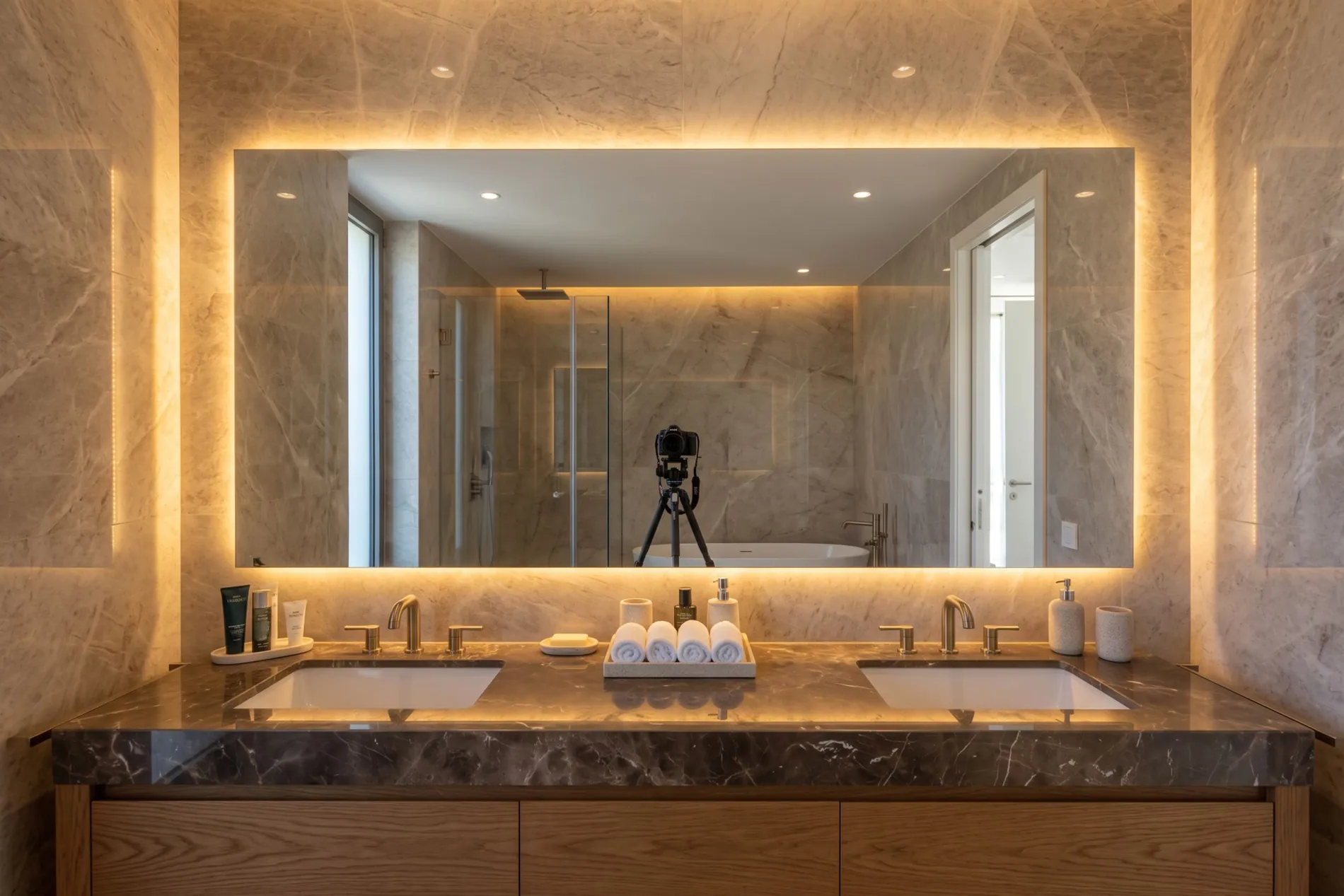
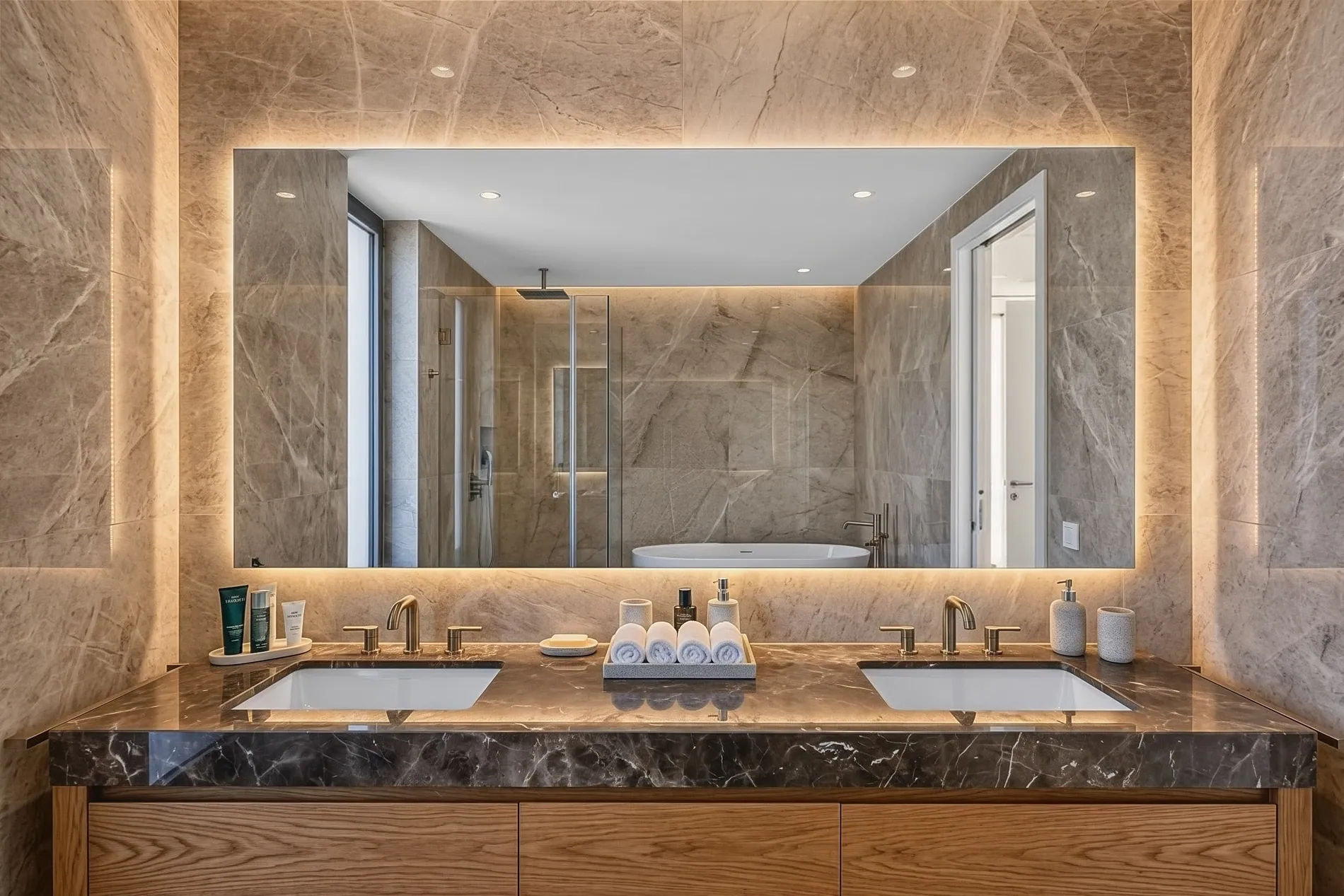
The photographer shouldn't be in the listing
Removing the photographer's reflection is one of the slowest jobs in real estate photo editing. You can't always shoot around a mirror, and cloning a tripod out by hand takes time on every bathroom.
Shoot the angle you want
Stand where the room looks best, not where the mirror can't see you.
The reflection is rebuilt
The camera isn't just blurred out. The tiles, the shower and the walls behind it are filled back in.
No cloning by hand
No clone stamp, no content-aware fill, no patching on every bathroom of every shoot.
Gone, with nothing left behind
Zoom in where the camera was. The tiles, the shower glass and the tub are filled back in, and the mirror's lighting and edges stay as you shot them.
Three steps to clean mirrors
Photographer and camera removal is a setting of Auto HDR, the Stager AI editor for real estate photographers. It runs as part of your normal edit.
- 01
Turn on Photographer & Camera Removal
In the Auto HDR sidebar, switch it on. It's on by default for photographer accounts, and your choice is remembered.
- 02
Upload your brackets
Drop in RAW or JPEG brackets, or let Dropbox auto-import send your shoots in for you.
- 03
Download clean photos
Mirrors and glass come back without you in them, merged, color corrected and ready to deliver.
Clean mirrors, real reflections
Removing the camera from a mirror means rebuilding what the mirror would show without it. Stager AI fills in the room behind the camera, so the reflection still makes sense.
- What changes
- The camera, the tripod and the photographer are removed from mirrors and glass, and the area behind is rebuilt.
- What stays
- The mirror frame, its lighting and the rest of the room keep your original pixels.
- Resolution
- Full resolution, the same size as your original files, in JPG or PNG.
- Workflow
- Runs inside your Auto HDR edit, in the web app or through the API, on whole shoots at once.
For everyone who delivers listing photos
Real estate photographers
Shoot bathrooms from the best angle and stop cloning your tripod out every evening.
Real estate media companies
Every photographer on the team delivers clean mirrors, through the web app or the API.
Real estate agents
Shooting your own listings? Get bathrooms without you or your phone in the mirror.
Remove the photographer, not the property
This setting removes the camera, the tripod and the person taking the photo. It doesn't remove or change anything that belongs to the home.
Part of every Auto HDR edit
Photographer and camera removal is a setting of Auto HDR, not a separate product. Each edited photo uses 1 photo credit. Plans start at 10 photos a month, and unused photos roll over.
No subscription? Ask us in the chat for a pay-per-photo deal, as low as $0.25 per photo depending on volume.
Questions about reflection removal
With Stager AI, switch on Photographer & Camera Removal in the Auto HDR sidebar and upload your brackets. The camera, the tripod and you are removed from mirrors and glass, and the reflection behind is rebuilt.
Yes. The camera, the tripod and the photographer are all removed when they show up in a mirror or in glass.
Yes. The room the mirror would show without the camera, like tiles, a shower or a window, is rebuilt, so the reflection still looks right.
For photographer accounts, yes. Anyone can switch it on or off in the Auto HDR sidebar, and the choice is remembered for the next shoot.
Reprocess the photo, or remove what's left in Review Images with the retouch tools.
Yes. Your HDR settings apply to shoots that come in through Dropbox, and the API has a photographerRemoval option on every HDR request.
It's part of your Auto HDR edit: each edited photo uses 1 photo credit. Plans start at 10 photos a month and unused photos roll over. For high volumes without a subscription, ask us in the chat for a pay-per-photo deal, as low as $0.25 per photo.
Shoot every bathroom from its best angle
Turn on Photographer & Camera Removal, upload your brackets and get mirrors without you in them. Your first photos are on us.