TV screen replacement for real estate photos
A glossy TV picks up the window, the lamps and sometimes you. Stager AI replaces the screen with a clean black one in every HDR edit, so the room looks calm and finished.
- Automatic on every interior
- Whole shoots at once
- Full-resolution results
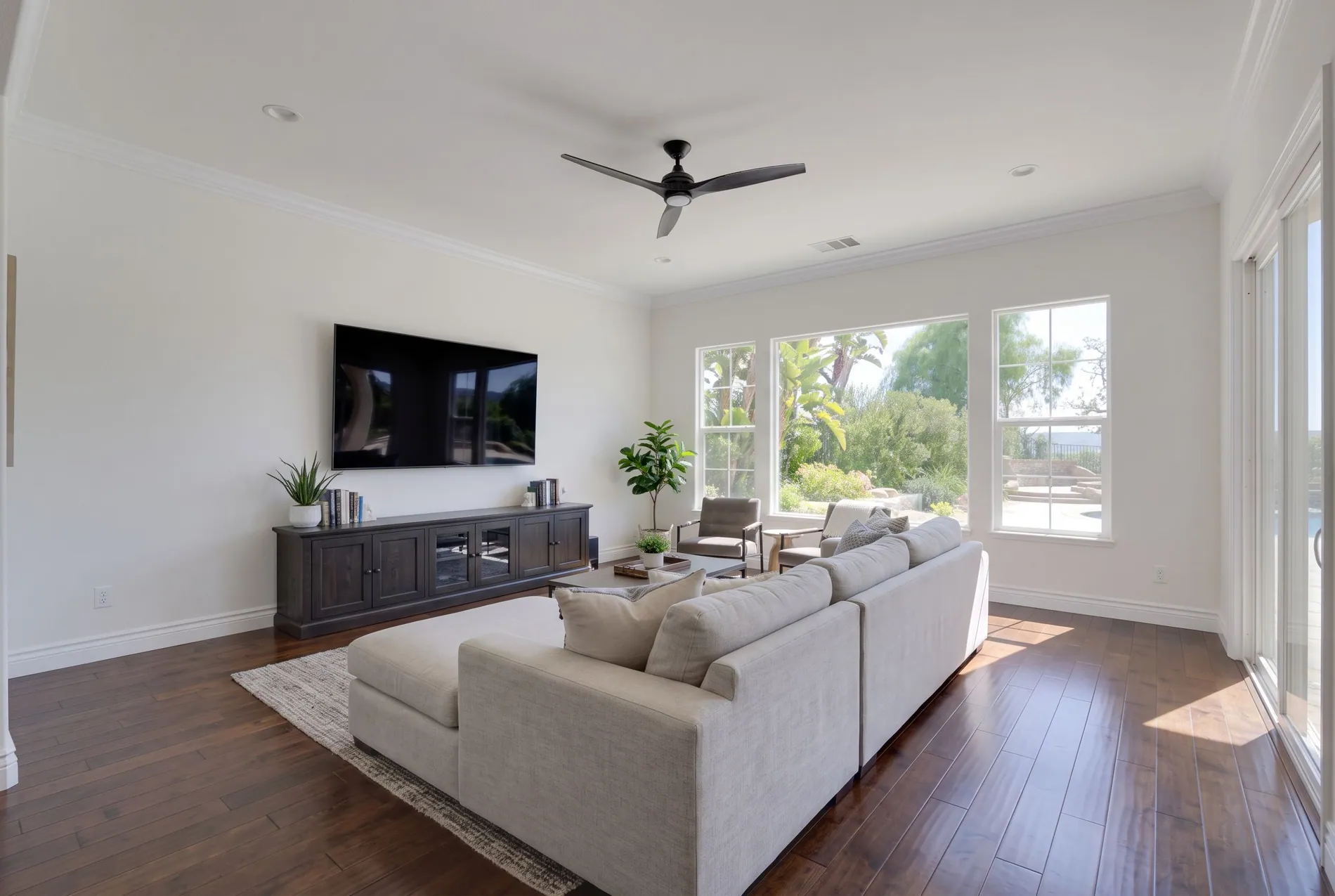
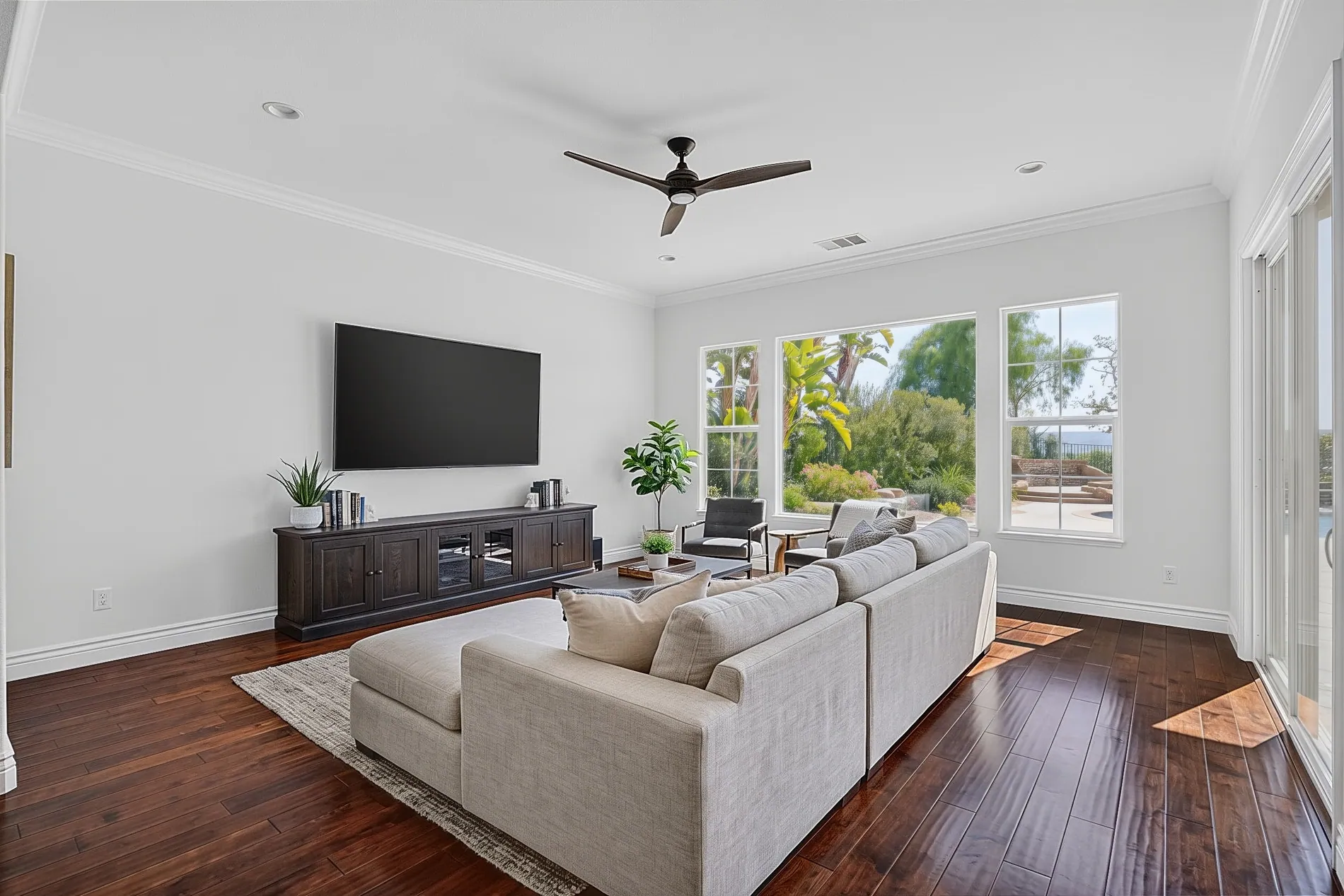
A shiny screen pulls the eye away from the room
TV screen replacement is a standard step in professional real estate photo editing. A bright reflection in a big black rectangle is the first thing buyers notice, and it makes a clean room look messy.
No more mirror on the wall
TV screens reflect windows, lights and the photographer. A black screen removes the distraction.
Consistent galleries
Every TV in the shoot gets the same clean finish, so the gallery looks like one set of photos.
Minutes back on every shoot
No masking screens one by one in Photoshop. It runs on every interior photo, with nothing to switch on.
Only the screen changes
Zoom in and the frame, the wall and the furniture are exactly as you shot them. Only the glass of the screen is replaced, with crisp edges and no halo.
Three steps to clean TV screens
TV screen replacement is built into Auto HDR, the Stager AI editor for real estate photographers. It runs automatically as part of your normal edit.
- 01
Upload your shoot
Drop in RAW or JPEG brackets, or let Dropbox auto-import send your shoots in for you.
- 02
TV screens are found
Every interior is checked for a TV. Each screen that's found is masked, frame excluded.
- 03
Download clean photos
Every TV comes back with a black screen, merged, color corrected and ready to deliver.
The same finish a pro editor would give it
Replacing a TV screen with black is what professional editors do by hand. Stager AI does it on every photo, at the full resolution of your camera files.
- What changes
- Only the screen. Glare, reflections and anything showing on it become a clean, even black.
- What stays
- The TV frame, the wall, the stand and the rest of the room keep your original pixels.
- Resolution
- Full resolution, the same size as your original files, in JPG or PNG.
- Workflow
- Runs inside your Auto HDR edit, in the web app or through the API, on single photos or whole shoots.
For everyone who delivers listing photos
Real estate photographers
Stop masking TVs at night. Every gallery comes back with clean screens.
Real estate media companies
Apply the same TV finish to every shoot and every photographer on your team, through the web app or the API.
Real estate agents
Upload the photos of your listing and get living rooms that look calm and tidy, without a reflection in sight.
The TV stays, only the glare goes
TV screen replacement shows the TV as it looks when it's switched off. It doesn't add or remove the TV or change anything else in the room.
Part of every Auto HDR edit
TV screen replacement is built into every Auto HDR edit, not sold separately. Each edited photo uses 1 photo credit. Plans start at 10 photos a month, and unused photos roll over.
No subscription? Ask us in the chat for a pay-per-photo deal, as low as $0.25 per photo depending on volume.
Questions about TV screen replacement
It's the editing step that replaces a TV screen with a clean black screen. TVs act like mirrors and pick up windows, lamps and the photographer. A black screen keeps the eye on the room.
No. Every interior photo edited with Auto HDR is checked for a TV, and the screen is replaced automatically. Exteriors are left alone.
It's built to find the TV screens in each photo and replace them. If one is missed, reprocess the photo or touch it up in Review Images.
No. Only the screen is replaced. The TV frame, the wall and the rest of the room keep your original pixels.
Yes. Shoots that come in through Dropbox and photos sent through the API go through the same Auto HDR edit, so their TV screens are replaced too.
No. Photos come back at full resolution, the same size as your original files, in JPG or PNG.
It's included in your Auto HDR edit: each edited photo uses 1 photo credit. Plans start at 10 photos a month and unused photos roll over. For high volumes without a subscription, ask us in the chat for a pay-per-photo deal, as low as $0.25 per photo.
Your next shoot, without a single shiny TV
Upload your photos and see clean screens in every room, with nothing to switch on. Your first photos are on us.